Optivexira
Anchor Module
Anchor Module
Couldn't load pickup availability
- 📁 Digital file available after purchase
- 🗂️ Long-term availability
- 🔒 Secure checkout
- 🗓️ Content updated in 2026
Self-paced learning overview
1. Problem Statement
When a website has many pages, internal links are often added without a clear system. Links may lead to pages that do not continue the topic, while anchor text sometimes does not explain where the user will go. In eCommerce, this can create confusion between categories, catalog item pages, informational materials, and supporting pages. As a result, navigation logic becomes weaker, and users may find it harder to move between related topics. Anchor Module is created for learners who want to work more carefully with internal links and topic connections.
2. Solution
Anchor Module explains how to build internal links based on topic, user intent, and page role. The course shows how to choose anchor text that is clear, relevant, and connected with the surrounding context. You will learn to separate a useful link from a random one that does not support site structure. A separate part of the materials focuses on eCommerce: connections between categories, catalog item pages, descriptions, help pages, and topic sections. This plan is for learners who want to make navigation more consistent and connect pages in a clearer way.
3. What’s Inside
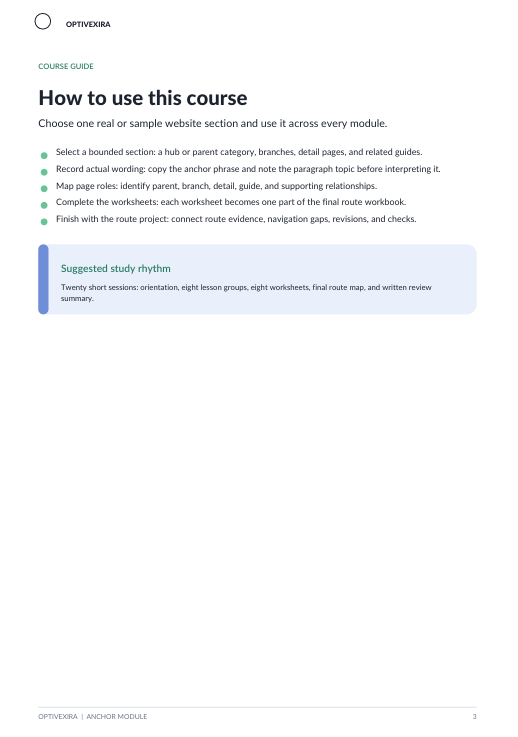
- Module 1: Anchor Logic Basics — how anchor text works and why it should match the page topic.
- Module 2: Internal Link Purpose — how to define the purpose of a specific internal link.
- Module 3: Context Match Review — how to check whether a link matches the content block where it appears.
- Module 4: Page Role Connections — how to connect main, supporting, and clarifying pages.
- Module 5: eCommerce Link Routes — how to build links between categories, catalog item pages, descriptions, and informational materials.
- Module 6: Anchor Text Variations — how to create anchor variations without repeating the same wording too often.
- Module 7: Navigation Gap Notes — how to find places where users may need a logical link to a related page.
- Module 8: Link Review Table — how to create a table for reviewing anchors, target pages, topics, and context.
4. Who is this for?
✅ Fits you if you...
- already have a basic site map or a list of important pages;
- want to better understand the role of internal links in SEO structure;
- work with categories, descriptions, informational pages, or content blocks;
- have an eCommerce project and want to organize links between related sections;
- want to learn how to write anchor text without scattered repetition.
❌ Not for you if you...
- are only beginning to explore SEO and do not yet understand basic page structure;
- are looking for an individual review of your website inside this plan;
- expect a ready-made link scheme for the whole project without your own work;
- do not plan to review content, navigation, or page connections;
- expect claims about specific metrics, rankings, or commercial outcomes.
5. What You’ll Learn
- Understand the role of anchor text in internal site structure.
- Define whether an internal link has a clear purpose.
- Check whether a link matches the page topic and surrounding context.
- Connect main, supporting, and clarifying pages.
- Create anchor variations without repeating the same wording.
- Analyze eCommerce links between categories, catalog item pages, and descriptions.
- Find navigation gaps between related topics.
- Maintain a table for reviewing anchors, target pages, and context.
6. Purchase Terms
Anchor Module is a paid Optivexira plan with materials for self-paced learning. Within 30 days after purchase, you may contact support about cancellation terms according to the rules shown on the checkout page. The course does not include claims about specific metrics, rankings, or commercial outcomes. The materials are intended for developing skills in internal links, anchor text, topic connections, and eCommerce navigation.
7. Certificates & Credentials
After completing Anchor Module, the learner receives an Optivexira certificate for studying anchor text, internal links, and contextual page connections.
1. Are the courses suitable for beginners?
1. Are the courses suitable for beginners?
Yes, the materials are structured so users with different levels of experience can work with them. Topics move step by step from basic ideas to practical examples for websites and eCommerce. If you are new to SEO, it is better to begin with the entry plans. If you already have experience, you can choose a wider set of modules.
2. Can I study at my own pace?
2. Can I study at my own pace?
Yes, the materials can be reviewed in a rhythm that fits your schedule. Each plan has its own structure, so you can return to topics and review them again. This helps with understanding terms, page logic, content, and technical elements. The format works well for people who combine learning with work on their own website.
3. What kinds of projects are these courses for?
3. What kinds of projects are these courses for?
The courses are created for websites, blogs, catalogs, eCommerce pages, informational resources, and small online projects. The materials explain how to think about page structure, search queries, categories, descriptions, and internal site logic. You can use this knowledge for your own project or to better understand SEO processes. The topics are not tied to specific services or programs.
Share